What is Bybit AI Hub? A guide to AI-powered crypto trading
AI Summary
Show More
Quickly grasp the article's content and gauge market sentiment in just 30 seconds!
AI assistants have moved beyond research and summarization, and they're now being embedded into financial workflows, from portfolio tracking to order execution. However, direct API trading has always demanded certain technical prerequisites: SDK configuration, authentication setup, and endpoint management that puts programmatic market access out of reach for most retail traders.
Bybit AI Hub changes the status quo. With it, you can now point any large language model (LLM) assistant at an AI-readable instruction and the assistant can execute trades, query market data and manage positions on Bybit — all with no installation, no configuration files and no code required.
Key Takeaways:
Bybit AI Hub lets any AI assistant use natural language instructions to execute trades, manage positions and query markets across 274 unique API endpoints.
The AI Skill Hub offers pre-built, one-click strategies, such as Dual Asset Smart Dip DCA, AI Event Double-Win and Risk Parity Yield Optimizer, that run within an AI Subaccount's sandboxed permissions, giving you delegated execution without manual prompt engineering.
With zero installation and built-in safeguards, such as confirmation cards and prompt injection protection, Bybit AI Hub opens professional-grade exchange access to traders who may not have a technical background.
What is Bybit AI Hub?
Bybit AI Hub is a hosted, AI-readable skill layer that sits between a user's natural language instructions and Bybit's trading infrastructure. When an AI assistant reads the skill definition, Bybit AI Hub gains the ability to interpret trading intent (e.g., "Open a BTC long position at 10x leverage") and translate it directly into the corresponding API call.
The AI tool currently covers 274 API endpoints across 11 modules, spanning market data, spot trading, derivatives, Bybit Earn products, account management, strategy execution, trading bots, copy trading, Alpha trading, pay/fiat services and advanced functions. This means users can perform end-to-end trading operations, such as analyzing markets, placing trades, adjusting positions and managing assets, through a single conversational interface, rather than through a brokerage dashboard or self-built integration.
How Bybit AI Hub works
When you paste the Bybit AI Hub Skill URL into any compatible AI assistant, the assistant fetches and reads the full skill definition. This definition maps natural language trading intent to specific supported functions: price queries, order placement, position management and more. The assistant then interprets user instructions and calls the corresponding endpoints. For trading operations (any action that moves funds or opens a position), a confirmation notice is displayed before execution; you must manually confirm the action to proceed.
The system features zero installation, automatic version updates on every skill read, and compatibility across major AI platforms, such as OpenClaw, Claude Code and Cursor.
What you can do with Bybit AI Hub
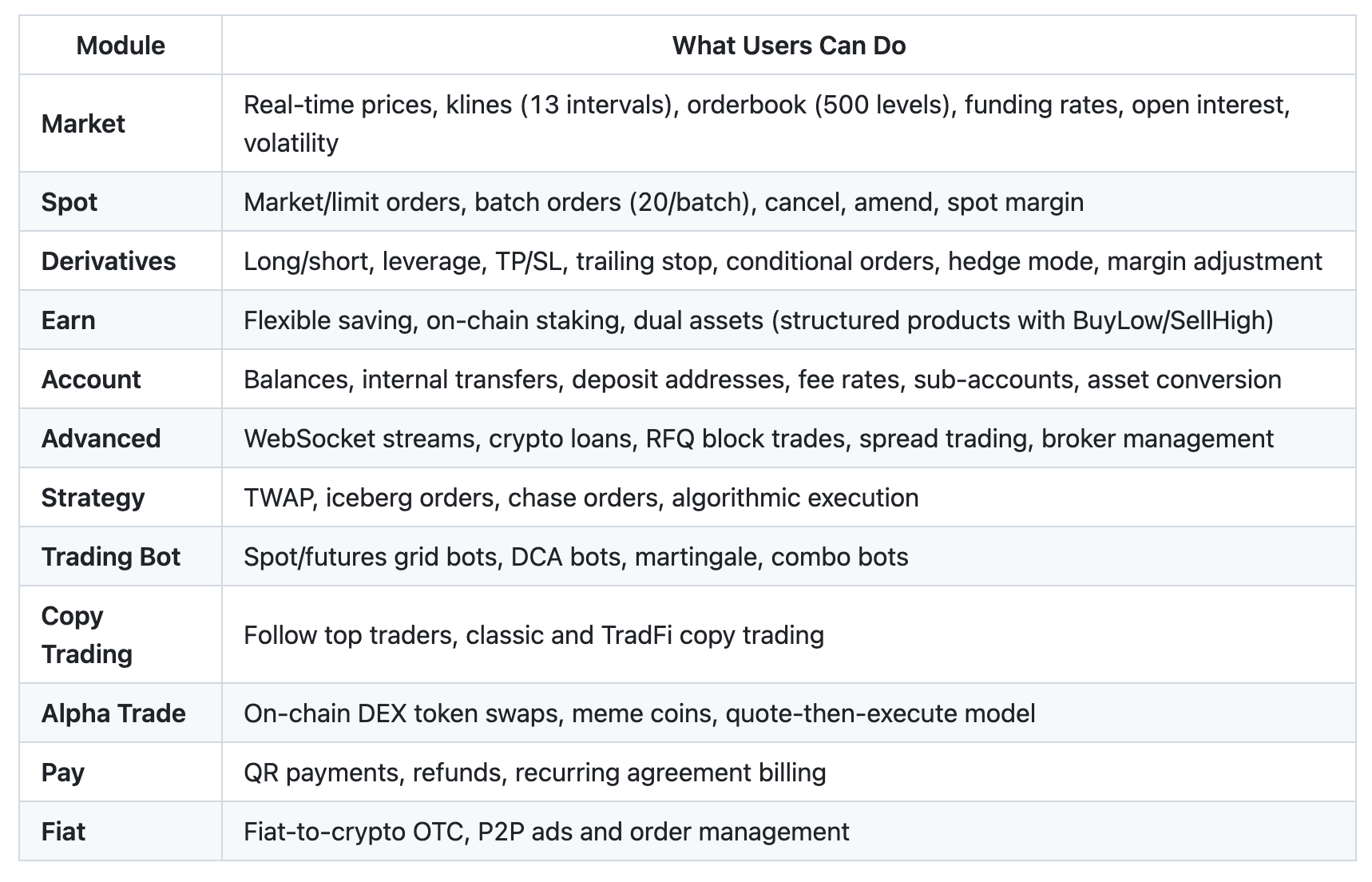
Bybit AI Hub's list of modules.
For most users, the AI Skill Hub (below) is the faster path — it packages these raw capabilities into one-click strategies. The module-level access remains available for users who want to give their AI agent custom, freeform instructions beyond pre-built skills.
AI Skill Hub: pre-built strategies for your AI agent
The modules above describe what the AI Hub can do at the API level. The AI Skill Hub packages that raw capability into ready-made strategies you can install with one click, no prompt engineering or configuration required.
Accessible at bybit.com/en/ai, the Skill Hub's tagline captures the idea: One click to power up your agent with advanced trading skills.
What is a skill?
A skill is a pre-built instruction set that gives your AI agent a specific trading or yield capability. Think of it as a plug-in: once installed, the agent gains the knowledge and permissions to execute a defined strategy on your behalf, without you needing to write or maintain the underlying logic.
Skills differ from raw API access in an important way. The 274 endpoints described above give an AI agent the ability to act on Bybit. A skill tells the agent what to do and when to do it, within boundaries you control through your AI Subaccount.
Available skills
Three skills are currently available:
Skill | Category | Level | What it does |
| Auto trading | Intermediate | Periodically uses Dual Asset products to buy the target asset below a preset price. Automatically selects the optimal strike price and renews on expiry if unexercised |
Auto trading | Advanced | Scans macroeconomic calendars and crypto news, evaluates event impact and automatically subscribes to Double-Win products ahead of major events to capture volatility opportunities | |
| Portfolio management | Intermediate | Allocates funds across crypto yield products using risk-adjusted returns and real-time APR to optimize portfolio performance |
Each skill is versioned (currently v1.0.1) and maintained by Bybit, so updates to strategy logic or supported products roll out automatically.
How to browse and search skills
The Skill Hub organizes skills by category using filter tabs at the top of the page:
All — displays every available skill
Auto trading — skills focused on automated order placement and position management (e.g., Dual Asset Smart Dip DCA, AI Event Double-Win)
Portfolio management — skills focused on allocation, rebalancing and yield optimization (e.g., Risk Parity Yield Optimizer)
A search bar lets you find skills by keyword as the library expands. Each skill card displays its name, a short description, category tag, difficulty level (Intermediate or Advanced) and version number.
How to install a skill into your AI agent
Installing a skill is a one-click process:
Browse the Skill Hub and find a skill that matches your strategy intent.
Click View Details to read the full skill description, supported products and risk profile.
Click the install button to add the skill to your connected AI agent.
The skill is now active, and your agent can execute the strategy within the permissions you've configured in your AI Subaccount.
No manual prompt writing, API key management or code is required. The skill definition handles the mapping between strategy intent and underlying V5 API calls.
How skills relate to AI Subaccounts
Every skill operates through an AI Subaccount — a sandboxed environment separate from your Main Account, with its own balance, permissions and risk limits. When you install a skill, the AI agent executes that strategy using only the funds and permissions available within the Subaccount.
This means:
A skill can never access your Main Account balance directly.
The AI agent can only act within the asset cap, transfer controls and leverage limit you configure.
Multiple skills can run simultaneously, each bounded by the same Subaccount-level constraints.
You fund the Subaccount by transferring assets in, and set boundaries before any skill takes action.
The AI Subaccount defines how much the agent can do. The skill defines what it does. Together, they provide a controlled, delegated execution model for strategies that would otherwise demand constant manual attention.
Security model for skills
Skills inherit the AI Subaccount's layered permission structure:
Asset cap: the maximum total value the AI agent can hold or deploy (default $5,000, adjustable in permission settings).
Transfer controls: rules governing how funds move into and out of the Subaccount.
Leverage limit: a ceiling on contract leverage the agent may use, capped independently of your Main Account settings.
Confirmation safeguards: write operations (order placement, position changes, transfers) trigger structured confirmation notices before execution, consistent with the broader AI Hub security model.
Isolation: the Subaccount is a hard boundary; no skill can reach your Main Account or exceed the permissions you've configured.
These controls apply uniformly whether you're running one skill or several. Adjusting any permission takes effect immediately and constrains all active skills within that Subaccount.
Advanced AI trading features
Beyond core spot and derivatives trading, the platform's 11 modules include several specialist capabilities:
Strategy — algorithmic execution tools including TWAP and iceberg orders
Trading Bot — grid and DCA automation via natural language
Copy Trading — account order replication through the conversational interface
Alpha Trade — DEX token swaps on supported chains
Pay/Fiat — QR payments, refunds, recurring billing through Bybit Pay, plus fiat-to-crypto OTC and P2P
Advanced — WebSocket real-time streams, flexible and fixed lending, institutional borrowing, block trading via RFQ, spread orders and broker commission management
These modules are available for freeform prompting through any connected AI assistant, independent of the pre-built skills in the Skill Hub.
How Bybit AI Hub protects your trades
Conversational interfaces carry an inherent execution risk — namely, that misread intent can mean an unintended order. Bybit addresses this hazard through layered safeguards built directly into the skill. Every mainnet write operation (order placement, position changes, transfers) triggers a structured confirmation card. In addition, order execution requires the user to type CONFIRM instead of just manually approving a dialog. Orders exceeding 20% of the available balance (or a $10,000 threshold) trigger an additional warning before you may proceed.
New users default to the testnet until they explicitly switch to the mainnet. Prompt injection protection ensures that text fields returned by API responses are displayed, but never executed as instructions.
What's next for Bybit AI Hub
The Skill Hub currently features three pre-built strategies, but the library is designed to expand. Future skills will target additional product categories, including derivatives hedging, cross-margin optimization and event-driven rebalancing. As new skills are published, they'll appear in the Skill Hub alongside existing ones, installable with the same one-click flow.
On the infrastructure side, the underlying module set will continue to grow beyond the current 274 endpoints, opening up additional agentic trading actions through natural language prompts.
Closing thoughts
For most traders, the barrier to programmatic exchange access was never about understanding the market. Instead, the obstacle was the technical layer required to reach it. Bybit AI Hub removes that layer by making a professional-grade API stack accessible through any AI assistant, with no setup required. Retail traders gain the same execution infrastructure that previously required developer resources, and professional traders gain a faster, conversational path to execution.
To get started, paste the Bybit AI Hub Skill URL into your preferred AI assistant and try a simple query, such as checking a live price or reviewing your account balance, to see how it works firsthand. #LearnWithBybit